Storyboard vs. Shot List: You Need Both, In This Order
This isn't a competition between two documents. It's a pipeline question — and getting the order backwards is why so many storyboards get redrawn.
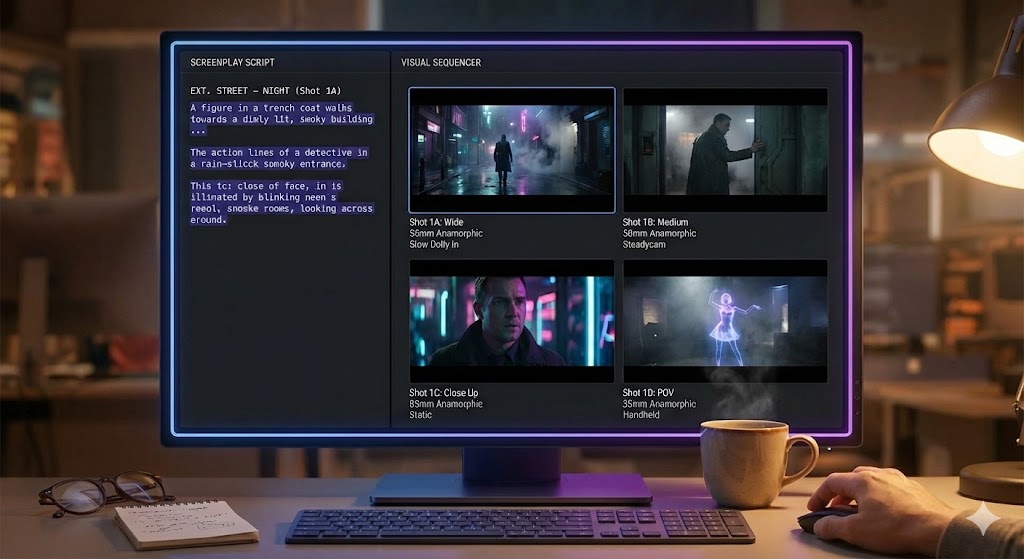
Two Documents, Two Jobs
A shot list is a decision record. For every shot, it captures the shot size (WIDE/FULL/MED/CU/ECU), the camera angle (EYE LEVEL/LOW/HIGH/DUTCH), the movement (STATIC/PAN/TILT/DOLLY/TRACK/CRANE/HANDHELD/STEADICAM), and the source line — the exact bit of script that justified the shot. It's text-first, fast to edit, and it's the document your AD builds a schedule from.
A storyboard is a visual record of the same decisions. It shows what the frame actually looks like: composition, blocking, roughly where light falls. It's the document you hand to someone who needs to see the shot, not read a spec for it — an actor, a location owner, a producer deciding whether to fund the scene.
Neither one is optional if the scene has any complexity, and neither one is a substitute for the other. A shot list without a storyboard leaves visual questions unanswered for anyone who isn't fluent in shorthand. A storyboard without a shot list is a set of pretty pictures nobody can schedule, budget, or trace back to a reason. If you're deciding which one to draw first, that's really what this whole question is about — and we cover the drawing-skill side of it directly in storyboarding when you can't draw.
Why the Order Matters: Shot List First, Storyboard Second
A storyboard frame answers one question: what does this shot look like? But it can only answer that question well if the decisions behind the shot are already made. Shot size, angle, movement, who's in frame, what the shot is covering — those are shot-list decisions. Draw the frame before you've made them, and you're not storyboarding a plan, you're guessing at one and hoping the picture holds up.
This is also, not coincidentally, the order the tools follow. ShotList.Studio's own pipeline runs Shot List → Characters → Locations → Storyboard for a reason: the storyboard generator needs the shot list's structured decisions — size, angle, movement, who's in the scene, where it's set — to produce a frame that means anything. Skip straight to generating an image from a vague idea of the scene and you get a nice-looking guess instead of a frame that reflects an actual plan.
A storyboard generated from a real shot list is a picture of a decision. A storyboard generated without one is a picture of a guess. They can look identical on the page — the difference only shows up on set.
What Happens When You Skip the Shot List
Draw boards first and one of two things usually happens. Either the boards quietly encode shot-list decisions nobody actually discussed — a lens choice, a camera height, a blocking pattern — that then have to be reverse-engineered into a schedule later. Or the boards get revised repeatedly as those decisions get made properly afterward, and half the drawing time turns out to have been wasted on frames that didn't survive the real planning conversation.
Either way, you end up doing the shot-list work anyway — just after the storyboard, instead of before it, with rework in between. The fix isn't more drawing discipline. It's sequencing: settle the shot before you draw it.
Using Them Together on a Real Production
In practice the two documents stay linked, not separate. Each storyboard frame should trace back to a specific shot-list entry — same shot size, same angle, same movement, same source line. When a frame gets tweaked (a "restage," in the terms this pipeline uses), the shot-list entry underneath it is what actually changed; the frame just gets regenerated to reflect it.
That link is also what makes an AI storyboard generator actually useful instead of just fast. Feeding it a structured shot list — not a loose paragraph describing the scene — is what lets it produce a frame that reflects a real plan rather than a generic interpretation of "a coffee shop scene." The output is only as good as the decisions it's translating.
| Question | Answered By |
|---|---|
| How long will this scene take to shoot? | Shot list |
| What does this shot actually look like? | Storyboard |
| Which line in the script justifies this shot? | Shot list |
| Does this location support the blocking? | Storyboard |
| What order should we shoot these in? | Shot list |
The Short Answer
Storyboard vs. shot list was never really a fair fight — they're not competing for the same job. You need the shot list to make the decisions, and you need the storyboard to see them. Build the shot list first, generate the storyboard from it, and the two documents stay in sync instead of drifting apart into two versions of the plan that disagree with each other.
One Pipeline, Not Two Documents to Reconcile
ShotList.Studio builds your shot list first, then generates storyboard frames straight from it — so the picture always matches the plan.
See the tool