Storyboarding When You Can't Draw
Every director eventually hits the same wall: you can see the scene perfectly, and you cannot draw it. Here's the honest, unglamorous ladder that gets a room seeing what you see anyway — no art degree required.
The Wrong Question
"I can't storyboard, I can't draw" is one of the most common things a first-time director says, and it's built on a false premise. Storyboarding was never a drawing test. It's a communication problem: you have a picture of a scene in your head, and everyone else on the crew — the DP, the AD, the production designer, the actor blocking their entrance — has a different one, or none at all. A storyboard's only job is to close that gap before you're standing on a cold set burning daylight arguing about where the camera goes.
Nobody asks whether a written outline is "good art." They ask whether it communicates. Storyboards deserve the same standard. A stick figure with an arrow through it, drawn in ninety seconds, that gets three department heads agreeing on blocking is a more successful storyboard than a beautiful painting nobody understood in time to shoot.
- What an AI Storyboard Generator Is Actually Good For — a closer look at Rung 3 below, and where it genuinely stops being useful.
- Storyboard vs. Shot List: You Need Both, In This Order — where a storyboard fits next to the rest of your pre-production paperwork.
This piece is the ladder we point people to first. It doesn't skip to the fun part. It starts with the cheapest, fastest, least impressive option — because for most scenes, that option is enough, and knowing when to stop climbing is the actual skill.
The Ladder: Four Honest Rungs
There isn't one "right" way to storyboard a scene without drawing skill — there's a sequence of options, each trading speed for fidelity. You climb only as high as the scene demands. A two-hander dialogue scene in a single location might never need to leave rung one. A car chase with three stunt units and a VFX vendor needs rung four before anyone touches a camera.
1. Stick Figures
Free, instant, and good enough for most blocking conversations you'll ever have.
2. Description Sheets
When a sentence communicates faster and more precisely than a bad drawing.
3. AI Prototypes
Fast visual drafts that make a scene legible to people who don't read shot lists.
4. A Hired Artist
When the boards themselves have to carry the production, not just start a conversation.
Rung 1: Stick Figures
Free. Fastest. Underrated.
This is the rung most people skip out of embarrassment, and it's the one working ADs actually use most often. A stick figure isn't a failed drawing — it's a diagram. Nobody is judging the linework on a continuity sketch taped to a video village monitor. They're reading it for three things: where are the bodies, where is the camera, and where is the frame line.
What a Stick-Figure Board Needs to Communicate
- Blocking: circles or stick figures positioned in the space, with arrows showing movement
- Camera position and lens angle: a triangle or camera icon pointing into the frame
- Frame line: a rectangle showing what's actually inside the shot versus what's cut off
- One clear label: shot size and the beat it covers, so nobody has to guess
That's the entire toolkit. You can do it on a napkin, a whiteboard, or the back of a call sheet. The information density is what matters, not the rendering. A DP reading a stick-figure board with a labeled frame line and a lens angle will understand the shot faster than they'll parse a gorgeous illustration with none of that information in it.
They struggle to communicate mood, lighting, or anything about performance. If the scene's success depends on an emotional tone the crew needs to feel before they shoot it — not just where to stand — you'll want to climb a rung.
Rung 2: Shot Description Sheets
When words beat wobbly lines
Some shots are genuinely hard to draw quickly but trivial to describe. A slow push in on a hand trembling over a doorknob, held for four seconds before the door opens — that's a five-second sentence and a frustrating fifteen-minute sketch. This is the rung where you stop trying to render what you can just say.
What Belongs on a Description Sheet
shot_14_description.txt
Shot 14 — CU, EYE LEVEL, STATIC
Frame: Hand on doorknob, slightly off-center right,
       thumb visible trembling
Movement: Slow push in, 85mm, 4 seconds
Beat: Hesitation before the door opens
Source: p.12, "She reaches for the handle and stops."
This is exactly the discipline behind a well-lined shot list — shot size, angle, movement, and the source line from the script that justified the shot. A description sheet is a storyboard with the drawing replaced by precision. For a crew that already reads shot lists fluently, it often communicates faster than an image would, because there's no ambiguity to resolve.
In practice, this rung and your shot list are the same document. If you're building shots in ShotList.Studio, the shot size, angle, movement, and source line are already structured fields — you're not writing a separate sheet, you're just reading the one you already have.
Where this rung fails: anyone who isn't fluent in shot-list shorthand — an actor, a location owner, an investor — will get very little from a page of "MED, DUTCH, HANDHELD." They need to see something. That's the gap the next rung closes.
Rung 3: AI Storyboard Prototypes
Speed, for the argument you need to win before you spend money
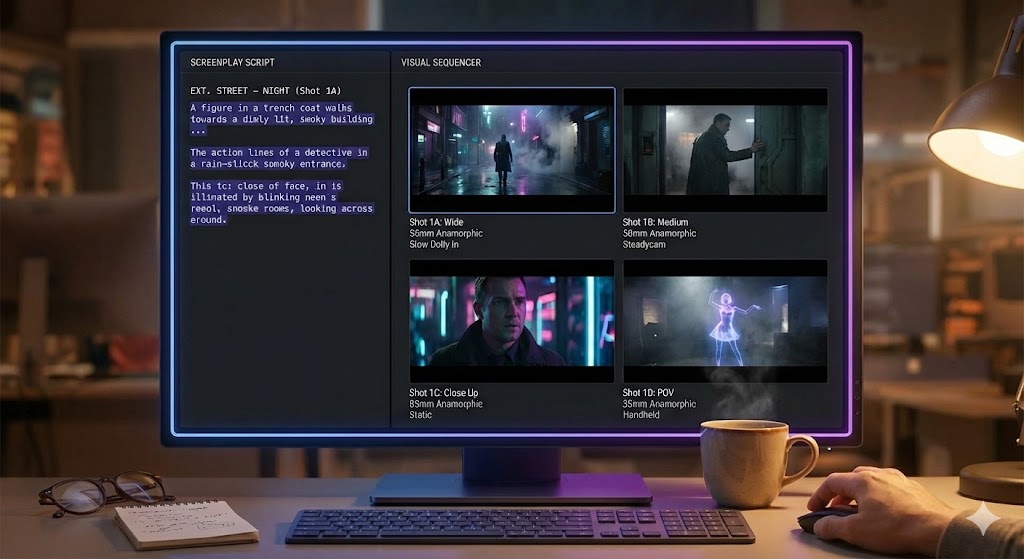
This is the rung that didn't exist a few years ago, and it changes the math for a lot of directors who used to stop at rung two out of necessity rather than choice. Feed a shot list into a tool like ShotList.Studio and it generates a visual draft of each setup — enough to show a producer, an actor, or a location scout roughly what the scene will look like, without waiting on a human illustrator's schedule or budget.
The honest framing matters here, and it's the whole subject of the next post in this series: an AI-generated board is a prototype, not a deliverable. It's for winning an argument — "does this blocking work," "does this location read the way I think it does," "will the investor understand what they're funding" — cheaply and fast, before real production money is on the line. It is not, and isn't trying to be, the final art that carries a shoot day.
Character consistency across frames, exact prop and wardrobe continuity, and precise geometric blocking are all places where current AI generation is inconsistent. Treat every frame as a draft to correct, not a locked reference. We go through the specific failure modes in the next post.
Where this rung genuinely earns its place: speed to a shared visual. A director who used to spend two days getting rough sketches back from a favor-owed artist friend can now get a full scene's worth of draft frames in minutes, tweak the ones that read wrong, and walk into a production meeting with something everyone can react to instead of imagine.
Rung 4: Hiring a Storyboard Artist
When the boards have to carry the production, not just start the conversation
There's a category of storyboard that isn't a communication aid — it's a production document that other departments build against. VFX previz that a compositing vendor bids off of. Stunt and action sequences that a coordinator uses to choreograph safety. A period drama's key frames that a production designer uses to lock a build. These need a professional artist's judgment: someone who understands anatomy, perspective, continuity, and the specific visual grammar of your genre well enough for the boards themselves to be trusted under scrutiny.
This is also, plainly, where the craft argument lives. ShotList.Studio's own position on this is direct: real art cannot be replaced by AI. The frames a tool generates are prototypes to argue with — fast sketches that get a room seeing the same film so the real decisions can start. When an image needs to mean something, or a set needs to be designed around it, that work belongs to a human artist.
What to Expect When You Hire
Storyboard artists typically price per board or by day rate, and the range is wide — it depends on the artist's experience, the complexity of the sequence, and your market. Get quotes from more than one artist before committing, the same way you would for any other department head. Treat any number you hear secondhand as a starting point for a conversation, not a budget line you can plan around sight unseen.
Use AI-generated frames to pitch, to argue, to lock the shot list. Then hire the hand. When you're ready for a storyboard artist, ShotList.Studio can connect you with one — just ask.
Choosing Your Rung
The skill isn't climbing to the top. It's matching your investment to what's actually at stake in the scene. Most scenes in most productions never need to leave rung one or two. Climbing further than a scene requires just slows you down for no craft benefit — the extra fidelity is wasted on a conversation that a stick figure would have settled just as well.
| Situation | Right Rung |
|---|---|
| Blocking a simple two-hander for your own DP | Stick figures |
| Handing shots to a crew fluent in shot-list shorthand | Description sheet |
| Pitching a scene to a producer or investor | AI prototype |
| Scouting whether a location supports your blocking | AI prototype |
| Briefing a stunt coordinator or VFX vendor | Hired artist |
| Locking a period or high-concept production design | Hired artist |
The Point of All of This
Directors who "can't draw" and let that stop them are solving the wrong problem. The job was never to produce art — it was to get everyone on the production seeing the same scene you're seeing, as fast and as cheaply as the stakes allow. Stick figures do that for most conversations. Description sheets do it for a crew that reads shorthand. AI prototypes do it when you need a room of non-specialists to react to something real. And a hired artist does it when the board itself has to hold up under production.
None of these rungs is the "real" storyboard and the others aren't fake versions of it. They're four tools for the same job, priced differently in time, money, and fidelity. Pick the cheapest one that closes the gap, and don't apologize for stopping there.
Start at Rung 3, Skip the Blank Page
ShotList.Studio turns your shot list into draft storyboard frames in minutes — a fast way to test blocking and win the room before you climb any further.
See the tool