Previz Explained: What It Actually Means for Filmmakers
"Previz" sounds like a word for people with a render farm and a digital-armies budget. Strip away the VFX-blockbuster branding and it's a discipline every filmmaker already half-does — figuring out what a shot looks like before you commit a crew and a location to shooting it.
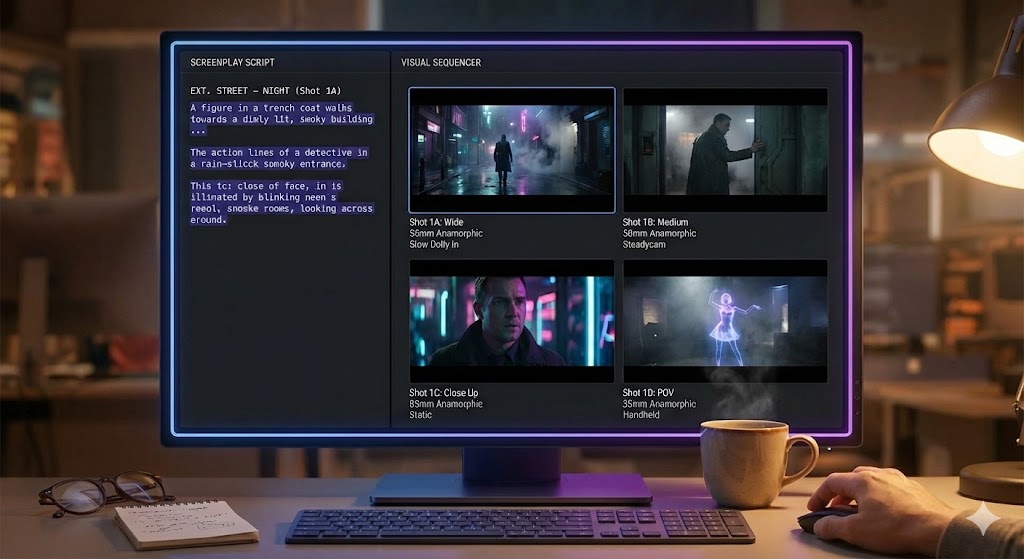
The Word That Sounds Bigger Than the Job
Say "previz" to most filmmakers and they picture a VFX house plotting a digital battle sequence for a superhero movie — a virtual camera flying through a scene that doesn't exist yet, months before a single frame is shot for real. That association isn't wrong, exactly. It's just the biggest, most expensive version of something much more ordinary: previsualization, at its root, is simply the practice of working out what a shot looks like and how it moves before you spend real time and money shooting it.
Every director who has ever walked a location with their hands framed like a viewfinder, or talked an actor through blocking before the camera is even set up, has done a version of previz. The blockbuster branding just makes it sound like it belongs to a department you don't have. It doesn't. Previz is a scale of effort, not a budget tier — the same discipline that plans a hundred-shot battle sequence also plans a two-person blocking pass in a studio apartment.
We cover the low-budget end of visualizing a scene at length in our guide to storyboarding when you can't draw. This post is about the specific piece of that work that's actually called previz, why it exists as its own term, and where it earns its keep on a production that isn't renting a render farm.
What Previz Actually Means
Previsualization is the process of creating a rough, disposable version of a shot or sequence — its blocking, its camera movement, and its timing — before you shoot the real thing. It grew up on VFX-heavy productions for a practical reason: when a shot involves a digital creature, a stunt rig, or a camera move that has to sync exactly with an effect added later, you cannot figure it out by improvising on the day. Too many departments need the same answer in advance — the stunt coordinator, the compositing vendor, the DP planning a crane path — so someone previsualizes the sequence first: a rough animated pass that nails down timing and movement well enough for every department to build against it.
The Detail That Separates Previz From a Storyboard
A storyboard is a set of static key frames — drawn instants that represent the important moments of a shot. Previz is concerned with what happens between those instants: how the camera actually travels, how long a move takes, where two moving elements intersect in time. A storyboard tells you the shot opens wide and ends on a close-up. Previz tells you how the camera gets from one to the other, at what speed, and what has to happen on the floor for that move to work.
That distinction is why previz became essential for VFX and stunt work specifically — those are the situations where the space between key frames is exactly what's expensive and dangerous to get wrong on the day.
What Previz Actually Solves on Set
Strip away the CG examples and previz solves one problem: it moves disagreements and discoveries earlier, to a point where they're cheap to fix, instead of leaving them for the day, when they're the most expensive kind of surprise a shoot can have.
A crew arrives, blocks the scene for the first time on the clock, discovers the camera move doesn't clear the doorway, re-blocks, resets lighting for the new positions, and loses the better part of an hour — multiplied across every setup where the plan met reality for the first time on set.
On a coordinated action beat, a dance number, or anything where camera and actor movement have to land in the same instant, previz is what lets a coordinator, a DP, and a director agree on the choreography before anyone is on the actual floor. On an effects shot, it's what gives a compositing vendor the camera data they need to bid the work accurately instead of guessing. In both cases, the previz pass is cheap and disposable — a rough animatic, a walkthrough, a marked-up floor plan — spent specifically so the expensive version, the actual shoot day, doesn't have to absorb that cost instead.
Previz for an Indie Short: The Wireframe Version
None of that requires 3D software or a previz house. On a short film or a low-budget feature, previz shrinks down to a wireframe blocking guide: a rough floor plan of the location, stick figures for the actors, arrows for their movement, and a separate arrow or path line for the camera, with rough timing notes where it matters — "actor crosses to window over four seconds, camera pans to follow, lands on CU as she stops."
If that sounds familiar, it should — it's the same information a well-built shot list already asks you to record. The movement field on a shot (STATIC, PAN, TILT, DOLLY, TRACK, CRANE, HANDHELD, STEADICAM) is a previz decision written down in one word. The staging notes — where each actor stands, where they move to — are the floor-plan half of the same job. On a small crew, previz isn't a separate deliverable so much as the discipline of actually deciding those fields before you're on set, instead of leaving them blank and figuring it out live.
If you're staging shots in ShotList.Studio, a restage after a blocking change is a fast redraw of the previz, not a fresh planning session — tweak the staging, regenerate, and move on. That loop is what makes previz worth doing even on a scene that only has one crew day.
A visual pass helps here more than a spreadsheet does, for the same reason a rough AI-generated frame helps a producer see a scene faster than a paragraph does — it's a draft to react to, not a locked plan. We go into that trade-off, and where it stops being reliable, in what an AI storyboard generator is actually good for.
Previz vs. Storyboard vs. Shot List
On a small production these three overlap so much they can feel like the same document wearing different hats. They're not quite — each answers a different question, and the difference matters most exactly when a scene gets complicated.
| Document | Answers |
|---|---|
| Shot list | What are all the shots, in what order, with what size, angle, and movement? |
| Storyboard | What does each shot look like at its key instant? |
| Previz | How does the camera and the action actually move between those instants? |
For most scenes, a shot list plus a light storyboard covers it — there's no meaningful movement between key frames to plan. Previz earns a separate pass specifically when the movement itself is the hard part. For the fuller argument on why the shot list has to come first regardless, see storyboard vs. shot list: you need both, in this order.
When You Can Skip It
Most scenes don't need a previz pass, and pretending otherwise just slows you down. A static two-shot dialogue scene, a simple coverage pattern of wide-medium-close, a single actor walking through an empty hallway — the movement is simple enough that a shot list and a rough storyboard already tell everyone what they need to know.
Previz starts earning its cost when a shot has more than one moving part that has to land together in time: camera and actor, actor and stunt performer, actor and a practical effect, or any shot where a location can't be re-blocked cheaply if the first attempt doesn't work. If your toughest coverage question is which angle to cut to next rather than how two things move in sync, you're solving a shot-list problem, not a previz one — worth checking against how to cover an action scene first.
The Takeaway
Previz isn't a VFX-only luxury reserved for productions with a render farm. It's risk management, scaled to whatever a scene actually needs: a rough floor plan and a few arrows for a simple blocking pass, a full animatic and a coordinator's sign-off for a stunt sequence that has to sync with an effect added months later. The name changes how big it sounds. The job — work it out before you're paying a crew to work it out live — stays exactly the same size problem it's always been.
Plan the Movement Before the Day
ShotList.Studio turns your shot list's staging and movement fields into draft storyboard frames — a fast way to previz a scene without a render farm.
See the tool